

Most people now spend their day at a screen. Hours of seated work press on the back and tire muscles around it. Slouching and a poorly arranged table often bring steady soreness, tiredness, and lower output. A smart desk setup for back pain can shift things in your favour.
Why Spine Care Depends on Your Workspace?
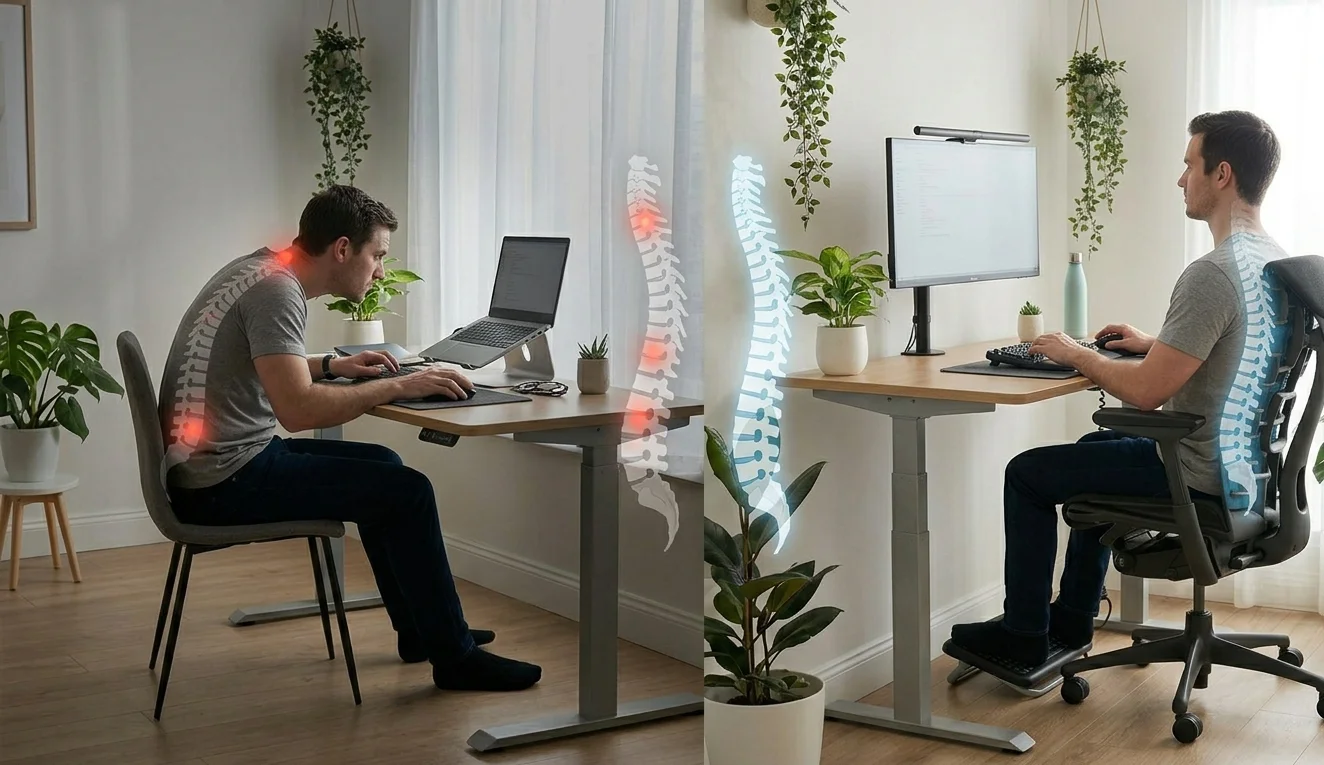
The spine is built for movement, not for staying locked in one pose. When your body slips out of line, certain muscles strain more to hold you up. That added load brings tightness, soreness, and ongoing pain.
Sound ergonomics holds your back, shoulder blades, and hip joints in their resting line. It spreads body weight evenly across all joints, so no single muscle group ends up doing the work of three.
How to Sit Properly During Long Work Hours?
Sitting style often gets missed. The right way to sit makes daily work easier and keeps tension off the lumbar area.
| Body Part | Correct Position |
|---|---|
| Back | Straight with shoulders eased down |
| Lumbar area | Keep its small natural curve |
| Feet | Flat against the floor |
| Knees | At or slightly under hip height |
| Body | No leaning toward the screen |
Your head should rest above your spine. A forward head pose stresses neck muscles. Shift positions often to ease tired muscles.
Best Posture and Body Position for Computer Work

A balanced pose needs good alignment and a smart layout. Aim for ears over shoulders, relaxed shoulders not raised, elbows folded near 90 degrees, forearms parallel to the table, and wrists held straight.
Your screen belongs at eye level so you skip tilting your head. Good posture is not stiff. It means staying aligned and shifting a little through the day.
Building the Right Desk Setup for Back Pain
A thought-out desk setup for back pain holds your body aligned through long hours of work. Real home office desk setups from makers around the world show how small choices turn a plain table into a back-friendly station.
| Item | What to Check |
|---|---|
| Chair | Backs the lumbar curve; height lets feet rest on the floor |
| Table | Lets elbows stay near the body at an easy angle |
| Monitor | One arm’s length away, top edge near eye height |
| Keyboard | Within easy reach; wrists held straight |
| Lighting | Bright enough to stop leaning in or squinting |
Working out of a tight room? A chair built for small spaces gives back support without crowding the floor.
Daily Habits That Guard Your Spine

Furniture alone will not fix your back. Take short breaks every 30 to 45 minutes. Stand or stretch often. Add gentle neck rolls and shoulder shrugs.
Movement brings blood back to muscles and clears stiffness from sitting. If you can fit a quick walk to refill your water, even better.
Simple Ergonomic Tweaks That Ease Back Pain
Many fixes are cheap but pay off for years. Use a footrest if your feet hang above the floor. Add a cushion behind your lumbar area. Raise the monitor with a stand or a stack of books.
Lift your laptop with a stand and pair it with an outside keyboard. These small fixes echo other science-backed ergonomic steps that ease daily strain.
What You Gain From a Better Desk Setup for Back Pain?
Good ergonomics shows up in daily comfort and output. Expect less muscle tiredness, sharper focus, lower odds of chronic back pain, and steadier posture.
Over time, these gains fight the wear that desk jobs tend to bring. A clean, minimal desk layout keeps both the body and mind less crowded.
FAQs
How long should I sit at one stretch?
Take a break every 30 to 45 minutes. A short stand, stretch, or walk eases muscle stress, lifts blood flow, and resets your posture for the next sitting block.
Is a standing desk better than sitting?
Both have perks. Swap between the two through the day for better spine health. Standing all day stresses the legs and lower back just as long sitting does.
Can poor posture really cause spine pain?
Yes. It puts steady stress on muscles and joints, which builds into lasting soreness. Years of slouching can also reshape how the lumbar and neck curves sit.
Do ergonomic chairs fully stop back pain?
A good chair holds proper posture, but stretching, moving, and steady habits matter just as much. No chair fixes back pain if you sit unmoved for eight hours.
Are laptops bad for posture?
Working off a laptop pulls you into a slouch since the screen and keys are joined. A laptop stand with an outside keyboard fixes that and brings the screen to eye level.
