

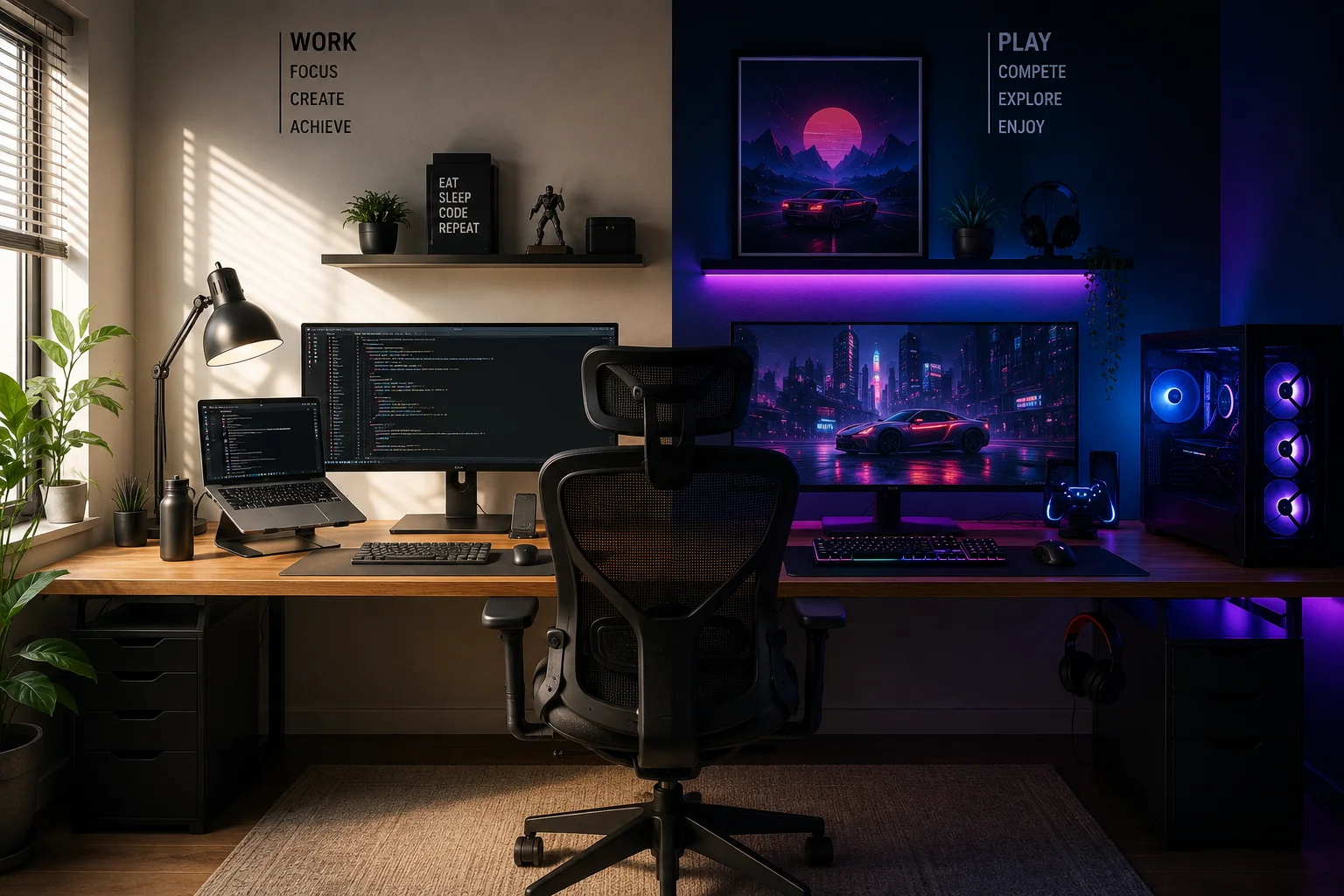
A modern desk setup often serves more than one purpose. During the day, it may support coding, design work, video meetings, or content creation, while in the evening it transforms into a hub for gaming and digital entertainment.
Whether you’re playing the latest AAA releases, watching esports, or visiting a trusted online casino in Canada, a thoughtfully designed workspace can make every activity more comfortable, immersive, and efficient.
Today’s home offices are no longer limited to productivity alone. Remote work, hybrid schedules, and increasingly powerful desktop hardware have made it easier than ever to create a setup that seamlessly transitions from professional tasks to leisure.
The key lies in choosing versatile equipment, prioritizing ergonomics, and organizing your space to minimize distractions while maximizing comfort.
Start with a Functional Desk
Every great setup begins with the desk itself.
The ideal desk should provide enough room for:
- One or two monitors
- A full-size keyboard and mouse
- Speakers or headphones
- Accessories and charging devices
- Comfortable arm positioning
Many users choose desks between 140 cm and 180 cm wide, offering enough space for both productivity and gaming without feeling cramped.
Height-adjustable desks have also become increasingly popular because they encourage movement throughout the day and help reduce fatigue during long sessions.
Invest in an Ergonomic Chair
A premium gaming PC means very little if you’re sitting in an uncomfortable chair for hours.
Instead of choosing a chair purely for aesthetics, focus on ergonomic support.
Look for features such as:
- Adjustable lumbar support
- Seat depth adjustment
- Height-adjustable armrests
- Breathable materials
- Reclining backrest
An ergonomic office chair often provides better long-term comfort than many racing-style gaming chairs, especially if your setup is used for work as well.
Choose the Right Monitor Configuration
Your monitor setup has a significant impact on both productivity and entertainment.
For work, dual monitors improve multitasking by allowing you to keep communication tools, documentation, and active projects visible simultaneously.
For gaming, options include:
- A single ultrawide display
- Dual 27-inch monitors
- One high-refresh gaming monitor paired with a secondary productivity display
High refresh rates (144Hz or above) provide smoother gameplay, while IPS panels offer excellent color accuracy for creative work.
Cable Management Makes a Bigger Difference Than You Think
One of the quickest ways to improve any workspace is by eliminating visible cable clutter.
Simple cable management solutions include:
- Under-desk cable trays
- Velcro cable ties
- Cable sleeves
- Adhesive clips
- Monitor arm routing channels
A cleaner workspace doesn’t just look better – it also makes maintenance easier and reduces distractions.
Lighting Shapes the Atmosphere
Lighting influences mood, focus, and comfort.
Many dual-purpose setups combine several lighting sources:
- Natural daylight
- Adjustable desk lamps
- Warm ambient lighting
- Bias lighting behind monitors
- Subtle RGB accents
The goal isn’t to overwhelm the room with colorful effects but to create an environment that feels comfortable for both focused work and evening gaming.
Audio Matters More Than Most People Realize
Good audio enhances productivity just as much as entertainment.
During work hours, quality headphones help minimize distractions during meetings or deep-focus tasks.
For gaming and media consumption, consider:
- Studio headphones
- Closed-back gaming headsets
- Compact bookshelf speakers
- External DACs or audio interfaces
Clear sound improves immersion while making everyday tasks more enjoyable.
Build Around Performance Needs
Your hardware should reflect how you actually use your computer.
Someone editing videos, compiling code, or working with AI tools may prioritize:
- Multi-core processors
- Large memory capacity
- Fast NVMe SSD storage
Gamers may instead focus on:
- Powerful graphics cards
- High-refresh displays
- Efficient cooling
- Stable internet connectivity
Fortunately, modern desktop hardware makes it possible to build a system capable of handling both demanding professional applications and the latest games.
Keep Accessories Within Reach
Small accessories can significantly improve daily comfort.
Useful additions include:
- Monitor arms
- Wireless charging pads
- USB hubs
- Headphone stands
- Desk mats
- Stream Deck controllers
- Webcam lighting
These accessories reduce clutter while making frequently used tools easier to access.
Personalize Without Creating Distractions
One of the best aspects of building your own workspace is adding personality.
Popular personalization ideas include:
- Small plants
- Framed artwork
- Mechanical keyboards
- Custom keycaps
- Desk figurines
- Acoustic panels
- Shelving with collectibles
The best setups feel personal without becoming visually overwhelming.
Minimalism often helps maintain focus while still allowing room for creativity.
Think About Long-Term Comfort
Many people optimize their setup for appearance but overlook long-term usability.
Questions worth asking include:
- Can you comfortably sit for several hours?
- Is the monitor positioned at eye level?
- Are frequently used devices within easy reach?
- Is the room well ventilated?
- Does lighting reduce eye strain?
Small ergonomic improvements often produce larger benefits than purchasing expensive hardware upgrades.
Future-Proof Your Workspace
Technology evolves quickly, but your workspace doesn’t need a complete rebuild every year.
Choose components that allow future upgrades, such as:
- Modular monitor arms
- Expandable storage
- Extra power outlets
- Larger desks
- Docking stations
- Adjustable shelving
Planning ahead makes it easier to adapt your workspace as your needs change over time.
A Setup That Supports Both Work and Play
The best desk setups don’t force users to choose between productivity and entertainment.
Instead, they create an environment where switching between professional work and personal hobbies feels effortless.
A clean workspace encourages focus during the day, while comfortable seating, responsive peripherals, and quality displays create an immersive experience after work hours.
Rather than viewing gaming and productivity as separate activities, many professionals now build workstations capable of handling both equally well.
For readers interested in ergonomic workstation design and healthier computing habits, the Occupational Safety and Health Administration (OSHA) provides practical guidance on workstation ergonomics and computer setup best practices.
Conclusion
A dual-purpose desk setup is more than a collection of hardware – it’s an investment in both productivity and comfort.
By selecting the right desk, ergonomic chair, displays, lighting, and accessories, you can create a workspace that supports focused work during the day and relaxing entertainment in the evening.
Whether you’re writing code, editing videos, attending meetings, playing competitive games, or simply unwinding after a long day, a thoughtfully designed setup helps every activity feel smoother and more enjoyable.
The best workspaces aren’t built around a single purpose – they’re designed to adapt to the way we live, work, and play today.
